 Developer's Profile
Explore Features
Click any feature to expand and see details.
Playback & Queue Flow
Zinging is built around channel-based music flow with quick queue handling.
- Type song names or paste links in the configured music channel.
- Queue controls are accessible through player buttons.
- Designed for continuous listening sessions in active servers.
Player Controls
Interactive controls are first-class in the player experience.
- Play/Pause, Skip, Stop/Disconnect actions.
- Queue view, volume up/down, and random controls.
- Fast control path for live voice channel usage.
Library & Music Setup
Server admins can shape how Zinging behaves for their community.
- `setchannel` for dedicated playback channels.
- `setvolume` for default volume control.
- `library` browsing plus clean disconnect/reset commands.
Recommendation Engine
Zinging includes recommendation commands for smarter music discovery.
- `recommend` for tailored suggestions.
- Preference reset and auto-history cleanup commands.
- Tier-aware recommendation support for advanced usage.
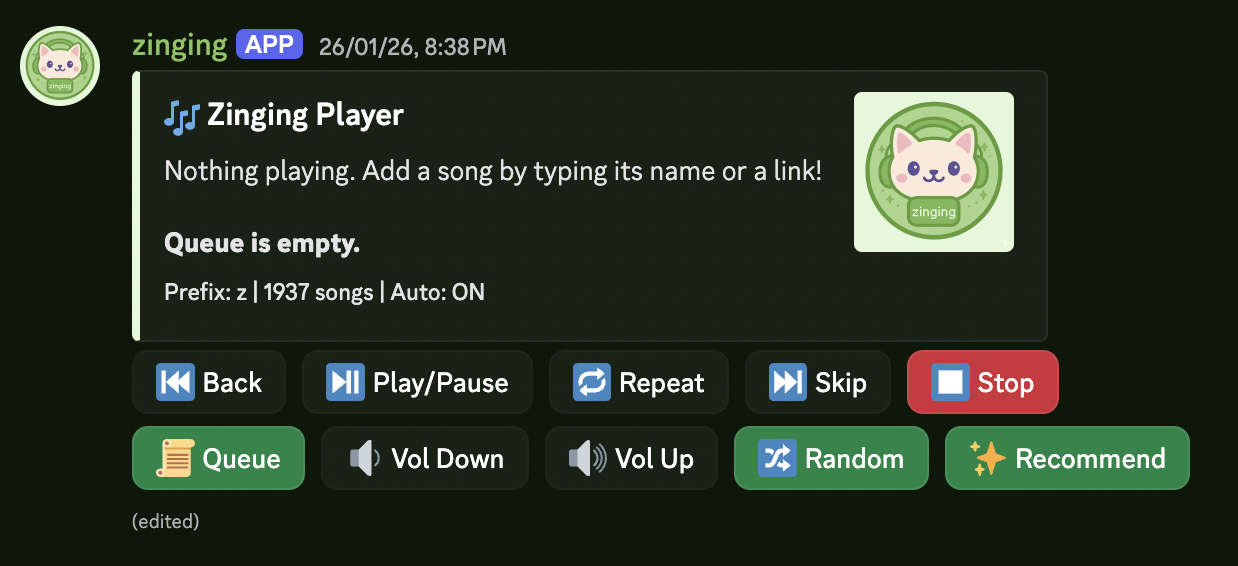
Live player preview